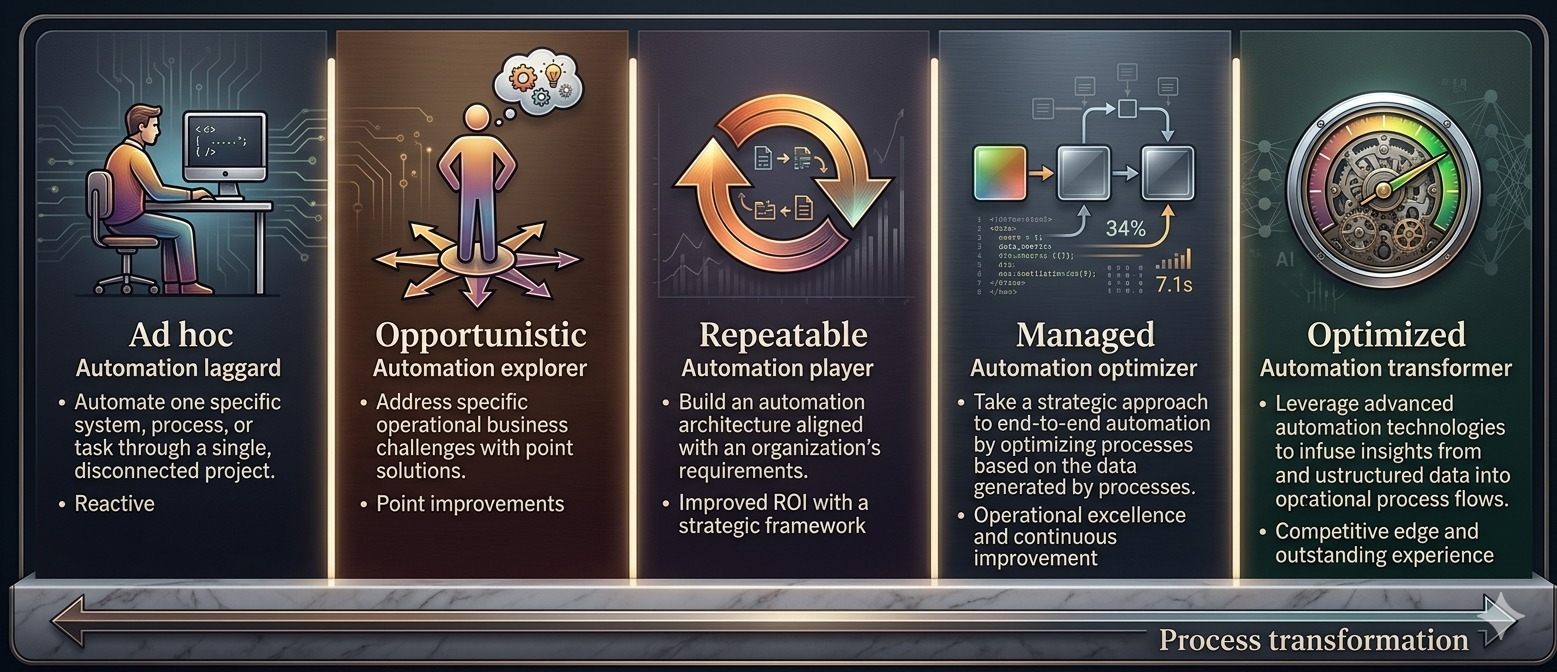
Process automation is the use of software technology to execute repetitive tasks and workflows without direct human intervention. Done well, it frees entire teams from mechanical work and redirects them toward higher-value activities — customer relationships, strategy, innovation.
In 2026, automation is no longer a "digital transformation" project reserved for large corporations. Thanks to generative AI models, low-code platforms and standard connectors to business systems, any company — from a 10-person SME to a multinational — can start with one concrete process and see results in weeks.
This guide gives you the full picture: what process automation actually is, what stages to follow, what technologies are available, what real benefits it delivers, and what mistakes to avoid. It is written for managers, founders and operational leaders who want to understand the terrain before investing.
What Process Automation Is
Business Process Automation (BPA) is the use of software and digital technologies to execute recurring tasks that were traditionally performed manually. The goal is not to replace people, but to eliminate mechanical work so people can focus on decisions and interactions that require human judgment.
A practical definition: process automation means letting a computer do the clear, repetitive, rule-based steps, and letting humans intervene only for exceptions, strategic decisions and oversight.
Examples are everywhere. An automatic SMS confirming a payment — automation. A CRM sending a follow-up email after a meeting — automation. An AI agent reading a PDF invoice and entering it into the ERP without being asked — that is modern automation, augmented with artificial intelligence.
Automation vs. AI-Augmented Automation
Classic automation (RPA, scripts, workflows) executes rigid rules on structured data. Any small variation breaks it. Modern AI-augmented automation can also process unstructured data (emails, PDFs, voice, images), understand context and handle exceptions. This is the fundamental difference that has unlocked entire categories of processes which, until 3 years ago, were considered "too complex to automate".
Process Automation and Digital Transformation
Digital transformation is not the same thing as automation, but the two reinforce each other. Digital transformation is the strategic shift through which a company rethinks its business model around technology. Automation is one of the concrete tools through which this shift materializes in operations.
Without automation, digital transformation remains a statement of intent. With automation, it translates into lower costs, shorter response times, better-informed decisions and real ability to scale without hiring proportionally.
Industry studies of recent years show a clear consensus: companies that prioritized automation in their digital strategy managed to grow per-employee productivity by 20-40% in 24-36 months, without mass layoffs — by redirecting human work toward higher-value activities.
Related reading — Business Process Automation with AI in 2026: The Complete Guide for European Companies: How to automate repetitive business processes with AI in 2026: concrete steps, real examples from EU companies, costs, ROI and a ready-to-use platform — natix.chat. Practical guide for managers and founders.
The Stages of Business Process Automation
Any serious automation project goes through the same stages, whether it is a simple automation or the transformation of an entire department. Skipping any of them almost always leads to failure.
1. Process Identification and Mapping
The first step is to pick a specific process and map it as it happens today — not as it should happen. Document the inputs, outputs, people involved, systems touched, average duration and frequency. Without this picture you end up automating "ideas", not realities.
2. Prioritization by ROI
Not all processes deserve automation. The best candidates have: high volume, high frequency, clear rules, few exceptions, and real pain felt by the team. Apply the simple formula (hours/month × cost/hour) − monthly solution cost = monthly ROI. If the result is positive within 6 months, it is a good project.
3. Solution Design
Before writing a single line of code or configuring a single integration, sketch the automated flow: what triggers execution, what steps it contains, what decisions are made along the way, what exceptions must escalate to a human, what gets logged. Clarity here saves weeks later.
4. Pilot Implementation
Start small. Implement the automation for a single department, single location or single transaction type. Run the pilot for 30 days in parallel with the existing manual process. This "shadow run" validates that the automation delivers identical or better results than the manual process.
5. Measuring Results
Compare against a clear baseline: time saved, errors reduced, team satisfaction, customer satisfaction. If you do not measure, you do not know. And if you do not know, you cannot justify future investments to the CFO or board.
6. Scaling and Governance
After the pilot, expand in a controlled way: another department, another transaction type, another customer segment. As the number of automated flows grows, you need governance — who approves new automations, who monitors, how you manage changes in logic, how you maintain GDPR compliance.
Related reading — AI Chatbot on Your Company Website: How to Increase Sales with 24/7 Support in 2026: How a custom AI chatbot for your company website can increase sales, lead qualification and customer satisfaction — without replacing people. Concrete examples, ROI and implementation guide for 2026.
Examples of Business Process Automation
The most common and most proven in real projects implemented over the past two years:
Supplier Invoice Processing
An AI agent receives PDF invoices by email, extracts supplier, amount, VAT and line items, validates against open purchase orders, then inserts them automatically into the ERP. Exceptions (discrepancies, new suppliers) are sent to a human for review. Typical saving: 3-5 hours per day for a buyer.
Employee Onboarding
On contract signature, an automated workflow creates required accounts (email, Slack, GitHub, CRM), sends the welcome kit, schedules mandatory training and notifies the manager. What used to take HR 2 days now takes 10 minutes.
E-commerce Order Processing
Orders received through the website are verified, stock is reserved in the inventory system, the invoice is generated in accounting, and the shipping label is created with the courier — all without human intervention, in under 30 seconds.
Email Triage Across Departments
A generic office@ inbox receives hundreds of emails daily. An AI agent classifies them (invoice, complaint, offer, legal, HR), identifies urgency and forwards them to the right person with a short summary. First-response time drops dramatically.
Automated Management Reporting
Data from ERP, CRM, accounting and marketing is automatically consolidated at the start of each month into a report with charts and an AI-written narrative, delivered to directors via email and Slack. What used to take 2-3 days now takes 15 minutes of review.
Website Lead Qualification
A chatbot talks to visitors who fill out the contact form, collects context (industry, revenue, concrete problem, urgency), tags the lead as hot/warm/cold in the CRM and forwards only the relevant ones to sales. Qualified lead conversion rate improves significantly.
24/7 Customer Support
An AI chatbot trained on company documentation answers frequent questions (price, availability, delivery time, return policy) around the clock. Complex cases are escalated automatically to a human agent with the full conversation context.
Related reading — AI in Your Company: A Practical Guide for Non-Technical Managers: No technical jargon: what AI is, what it can concretely do for your team, what it cannot do, and how to evaluate whether an AI project is worth the investment.
Core Technologies for Process Automation
Automation is not a single technology — it is an ecosystem. Here are the main pieces and when each one makes sense.
RPA — Robotic Process Automation
Software robots that mimic human UI actions: clicks, form filling, copy-paste between systems. Perfect for stable processes on legacy systems that have no API. Major limitation: any UI change breaks them.
Workflow Automation
Orchestration through visual connectors and rules: "when X happens, do Y, then Z". Platforms like n8n, Make or Zapier offer hundreds of ready-made connectors. This is the backbone of most modern business automations.
Hyperautomation
The orchestrated combination of multiple technologies (RPA + AI + workflow + analytics) to automate complete end-to-end processes, including decisions. Gartner has identified hyperautomation as one of the most important strategic trends of recent years.
IPA — Intelligent Process Automation
Next-generation RPA with AI built in. Can read documents (OCR + LLM), understand intent in text, take decisions based on trained models. Covers areas that were impossible to automate with classic RPA.
Low-code / No-code
Platforms that allow building flows through visual interfaces, without code. They democratize automation: business analysts and managers can build simple flows themselves, without waiting for IT.
Artificial Intelligence and Large Language Models (LLMs)
Models like GPT, Claude or Gemini bring automation the ability to understand natural language, write coherent responses, extract data from free text, classify and summarize. This is the component that has opened the most new use cases in the past 2 years.
Natural Language Processing (NLP)
A subdomain of AI dedicated to understanding and generating human language. Powers chatbots, sentiment analysis, message classification and entity extraction. In 2026, modern NLP is practically indistinguishable from LLMs for most applications.
Machine Learning
Algorithms that learn from historical data to make predictions: which leads are most likely to convert, which customers risk churning, which products will be in demand next week. Powers the predictive component of automations.
Big Data and Data Pipelines
The infrastructure that enables processing large volumes of data — modern databases, data lakes, ETL pipelines. Without clean, well-structured, accessible data, no intelligent automation works at scale.
Intelligent ERP and CRM Systems
Modern ERPs and CRMs (SAP, Odoo, HubSpot, Salesforce) have embedded AI features. Many automations are built directly on top of these systems, extending native functionality with custom AI agents and flows.
Related reading — How European Companies Are Cutting Operational Costs by 40% with Automation: Case study: how teams of 5-50 employees in Romania, Poland and Czech Republic eliminated repetitive tasks and reduced costs by 35-45% in less than 6 months.
Benefits of Process Automation
When done right, automation delivers measurable benefits across several axes simultaneously:
- Lower operational costs — repetitive tasks consume the most expensive hours in the company; automation eliminates them.
- Higher speed — what used to take hours or days starts happening in seconds or minutes.
- Fewer errors — computers do not get bored or make mistakes on the 100th invoice like on the first.
- Visibility and auditability — every execution is logged, you can always answer "who did what, when".
- Easier compliance — GDPR, ISO and internal audits become much simpler when processes are documented in code.
- Improved customer experience — faster responses, 24/7 availability, consistent communication.
- Ability to scale without proportional hiring — you can double volume without doubling the team.
- More motivated team — people freed from mechanical tasks focus on meaningful work.
Related reading — 5 Business Processes You Can Automate with AI in Less Than 2 Weeks: The fastest wins for companies that want to start with AI: 5 concrete processes you can automate in 2 weeks, with immediate ROI and minimal investment. Practical guide for 2026.
Common Mistakes to Avoid
Automating a bad process
If your manual process is chaotic and full of exceptions, automation will make it chaotic faster. Simplify the process before automating it — sometimes half the benefits come from simply cleaning up the process.
Choosing technology before understanding the process
"We bought expensive software, now we need processes to justify it" — the classic trap. Always the other way: understand the process, then pick the right technology.
Not involving the team that will use the automation
The people doing the manual work today know details no one else knows. Involve them from the start. Otherwise you build a solution that looks good on paper and that no one actually uses.
Ignoring the human-in-the-loop
AI makes mistakes — less often than humans, but it does. Any high-stakes automated flow needs a human verification checkpoint for exceptions. Full automation without oversight = risk without proportional reward.
Waiting for perfection before launching
80% functional now beats 100% in 6 months. Launch the minimum viable version, measure, adjust. Iteration beats planning.
Related reading — GDPR and Automation: How to Process Customer Data Without Violating European Regulations: Practical guide for EU companies: how to implement automations that process personal data in compliance with GDPR, without blocking digitalization projects.
Frequently Asked Questions about Process Automation
How much does it cost to automate a simple process?
For a simple flow with 1-2 integrations, setup typically costs between EUR 800 and 2,500, plus EUR 50-150 per month runtime. For medium automations (several flows, AI agent, ERP/CRM integration), costs rise to EUR 3,000-8,000 setup and EUR 150-400/month.
How long does implementation take?
A simple, well-defined process can be in production in 2-4 weeks from kickoff. After the first flow, adding similar ones is much faster — usually 1-5 days each, because the infrastructure and integrations are already in place.
Do I need developers in-house?
For many processes, no. Low-code platforms (n8n, Make, Zapier) allow building flows visually. For complex integrations, very specific logic or very high volume, technical help becomes necessary — but far less than 5 years ago.
What happens to employees whose tasks I automate?
Companies that succeed with automation do not fire — they redirect. People freed from mechanical tasks move to higher-value work: customer relationships, strategy, sales, innovation. Automation makes organizations more scalable, not emptier.
What is the difference between RPA and AI automation?
RPA executes rigid rules on structured data — it does exactly what you told it, with no variation. AI automation understands context, processes unstructured data (free text, PDFs, voice) and can decide based on content. In 2026 the two are complementary, not alternatives.
Is it GDPR-compliant?
It can be, if designed correctly. Minimum rules: use EU-hosted services, sign Data Processing Agreements with AI vendors, document the flows in your Records of Processing Activities, and ensure human-intervention possibility for decisions with significant impact on individuals (GDPR Art. 22).
Next Steps on Your Automation Journey
If you have read this far, you already have more context than 80% of companies that start an automation project. The next practical step is extremely simple: pick a single process in your company that is either annoying or expensive, and evaluate it.
Look at four signals: high volume (it happens often), clear rules (there is a "this is how we do it"), real pain (the team complains about it) and clean data (the information exists somewhere, not only in someone's head). If a process ticks all four, it is an excellent candidate for automation.
For companies that want to start without building their own infrastructure, Natix offers a free 5-minute evaluation: you answer a few questions about your company and receive a digital maturity score, an automation potential level and the top 3 recommended processes for implementation in the next 90 days.
Automation is not an all-or-nothing project. It is a series of small decisions, tested, measured and repeated. Companies that understand this now will have an operational advantage in 2-3 years that competitors will find very hard to catch up with.
Want to automate your business processes?
Schedule a free evaluation and discover how you can reduce costs with AI.
Free evaluation